
How to Make a Bulin 47 AI Video From One Photo
Bulin 47 AI Team · Last updated:
On this page
To make a Bulin 47 AI video, select one clear portrait, choose Bulin 47 in the studio, review quality, duration and credits, then submit. The original mode uses the built-in freestyle reference and audio. Choose Havana corner or Christmas street when you want to write your own lyrics instead.
You can prepare the photo and settings before committing to generation. The walkthrough below follows the actual studio; its screenshots show the interface, not a newly generated video.
Should you choose Bulin 47 or a custom-lyrics scene?
Choose Bulin 47 for the reference street performance and its audio. Choose a custom scene for a newly generated performance guided by your photo, the scene and your lyrics.
| What you want | Studio choice | What you provide |
|---|---|---|
| The recognizable original freestyle format | Bulin 47 | One portrait and supported video settings. |
| A personal verse in a Havana setting | Havana corner | One portrait, your lyrics and supported video settings. |
| A festive street performance | Christmas street | One portrait, your lyrics and supported video settings. |
Custom scenes use a different generation process. Their motion and timing are newly generated; switching a scene does not mean the original choreography will be preserved. Review the available model choices in the settings panel.
What should you look for in the Bulin 47 reference?
Look at framing, gestures and sound separately before deciding whether the original mode fits your idea. The close street camera, expressive performer and surrounding activity explain the visual format better than a single still image.
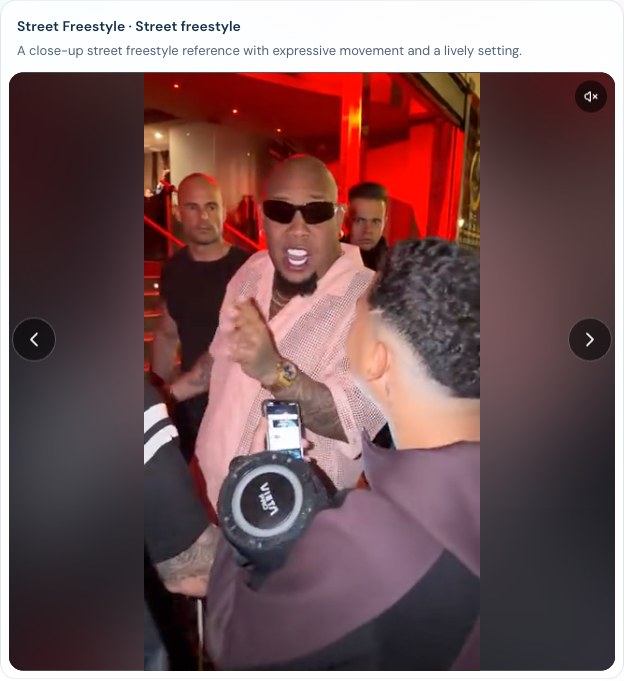
The built-in reference player. A reference shows the intended format; it is not a promise that every generated frame will match.
Watch once for the overall performance. On a second viewing, notice how far the face moves, where the hands enter the frame and how much background remains visible. Then listen to the audio. If your idea needs different words, choose a custom-lyrics scene rather than expecting the original mode to replace the verse.
How do you make the video step by step?
Prepare the input first, then check the quote immediately before submission.
- Select one portrait. Use a clear image with one main subject. The photo guide covers file limits and framing.
- Choose the style. Select Bulin 47 for the reference performance, or a scene for custom lyrics. Enter the words you want performed when using a custom scene.
- Open quality and duration. Review the model, resolution, length and aspect ratio. The options depend on the selected style and model.
- Review permissions and credits. Confirm you may use the photo and depict its subject. Read the current credit total; changing settings can change the charge.
- Sign in and submit when ready. Follow the account prompt if needed. Content checks must pass before generation starts.
- Review and save the result. Check the full video, then download within the displayed access window. Completed videos are accessible for 7 days.
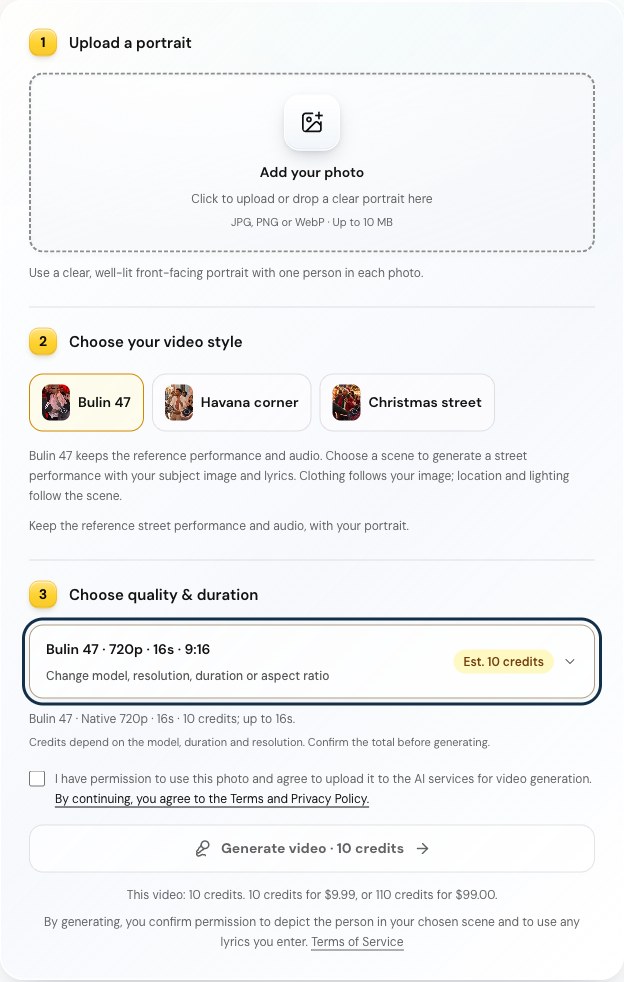
The desktop studio with the original mode selected. The disabled button reflects an empty photo field and unconfirmed permissions; no generation was submitted for this screenshot.
For custom lyrics, start with one short, easy-to-follow idea. Longer text is not a guarantee that every word will fit the selected duration. Generated singing, pronunciation and lip movement can differ from the text.
How much does a Bulin 47 AI video cost?
The quote shown in the studio is the amount to check before generating. At the time of these screenshots, the original mode showed 10 credits for 16 seconds at 720p and 15 credits at native 1080p. Other lengths and custom models have different quotes. See current pricing for pack prices.
If required moderation is unavailable or your input is rejected before generation, no generation credits are deducted. A confirmed failed task returns reserved credits. A task still processing is not yet a failure, and a successful result you dislike is not automatically a failed task. The Refund Policy explains credit returns and cash refunds separately.
Video creation FAQ
Do I need a Bulin 47 AI prompt?
The original mode has its reference built in, so you do not need to write a separate prompt. Custom scenes ask for your lyrics and provide their own scene settings.
Can I choose the video length and shape?
Yes, from the options supported by the selected style and model. Use the aspect-ratio guide to choose the shape before submission.
Will it look exactly like the reference?
No. Facial details, motion and timing can vary. The reference helps define the performance, while the output is generated by AI. Before posting, follow the download and sharing checklist.